
Hey there, fellow traders! If you've ever clicked on a graphical object in MetaTrader 5 and thought to yourself, "What’s the story behind this?" then you're in for a treat with the id_digits_object indicator. This nifty tool provides some insightful details right in the Experts tab of your terminal.
- Name and type of the clicked object;
- Date and values of its anchor points;
- The number of decimal places (digits in the fractional part) for those anchor point values.
This indicator works seamlessly with graphical objects in both the main window and its subwindows. It’s particularly useful for spotting non-normalized anchor point values by showing you how many decimal places are involved. You can even use the decimal calculation function separately in any program you like!
The id_digits_object is compatible with a variety of graphical objects, including:
| Identifier: | Description: |
|---|---|
| OBJ_HLINE | Horizontal Line |
| OBJ_TREND | Trend Line |
| OBJ_TRENDBYANGLE | Trendline by Angle |
| OBJ_CYCLES | Cycle Lines |
| OBJ_ARROWED_LINE | Arrowed Line |
| OBJ_CHANNEL | Equidistant Channel |
| OBJ_PITCHFORK | Andrews' Pitchfork |
| OBJ_GANNLINE | Gann Line |
| OBJ_GANNFAN | Gann Fan |
| OBJ_GANNGRID | Gann Grid |
| OBJ_FIBO | Fibonacci Retracement |
| OBJ_FIBOTIMES | Fibonacci Time Zones |
| OBJ_FIBOFAN | Fibonacci Fan |
| OBJ_FIBOARC | Fibonacci Arcs |
| OBJ_FIBOCHANNEL | Fibonacci Channel |
| OBJ_EXPANSION | Fibonacci Expansion |
| OBJ_ELLIOTWAVE5 | Elliott Motive Wave |
| OBJ_ELLIOTWAVE3 | Elliott Correction Wave |
| OBJ_RECTANGLE | Rectangle |
| OBJ_TRIANGLE | Triangle |
| OBJ_ELLIPSE | Ellipse |
| OBJ_ARROW_THUMB_UP | Thumb Up |
| OBJ_ARROW_THUMB_DOWN | Thumb Down |
| OBJ_ARROW_UP | Arrow Up |
| OBJ_ARROW_DOWN | Arrow Down |
| OBJ_ARROW_STOP | Stop Sign |
| OBJ_ARROW_CHECK | Check Sign |
| OBJ_ARROW_LEFT_PRICE | Left Price Label |
| OBJ_ARROW_RIGHT_PRICE | Right Price Label |
| OBJ_ARROW_BUY | Buy Sign |
| OBJ_ARROW_SELL | Sell Sign |
| OBJ_ARROW | Arrow Object |
| OBJ_TEXT | Text Object |
Now, let’s talk about a common scenario: sometimes, indicators set in a chart's subwindows show values that differ from those in the main window by decimal places. This indicator comes in handy for checking the decimal place number of anchor points of your graphical objects, even those set in subwindows.
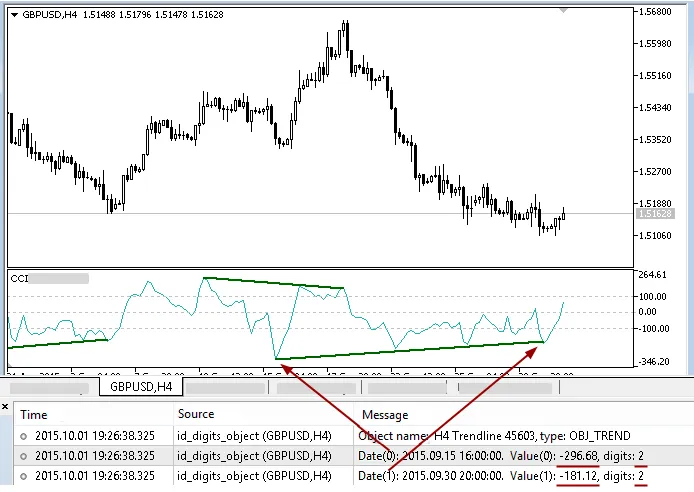
Fig. 1. CCIindicator's subwindow with two-digit values on a chart with five-digit quotes.
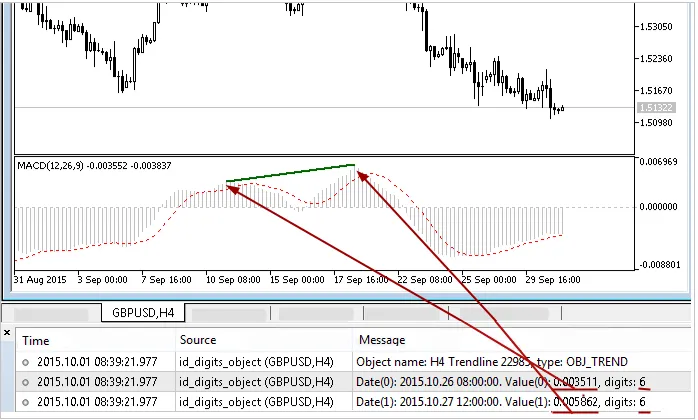
Fig. 2. MACD indicator subwindow with six-digit values.
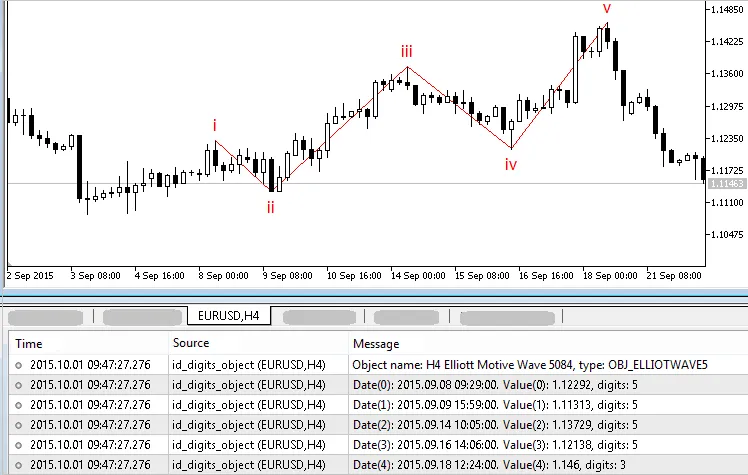
Fig. 3. Elliott Motive Wave anchor point values in a chart's main window.
Now, you might run into some strange differences when using the id_digits_object indicator. For instance, in Fig. 4, a line with five digits appears clearly on a five-digit quotes chart, but the indicator displays eight digits:
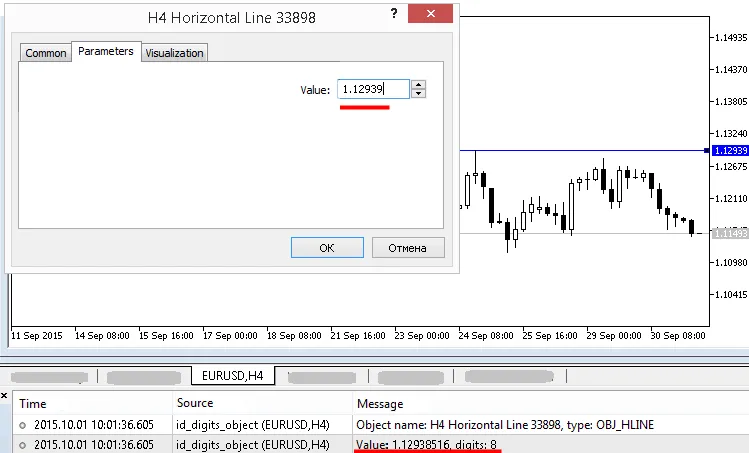
Fig. 4. id_digits_object detects a non-normalized value at a horizontal line.
If that happens with a programmatically set object, check if the value normalization was applied when the objects were created. For manually set objects, you can adjust their values by:
- Opening the object's properties dialog and clicking on its anchor point value (if it has multiple values, just click on the top one);
- Closing the properties dialog by hitting the "Ok" button.
After that, click on the object again to ensure the values are normalized with the id_digits_object. Check out Fig. 5 and Fig. 6 for a visual guide on these steps:
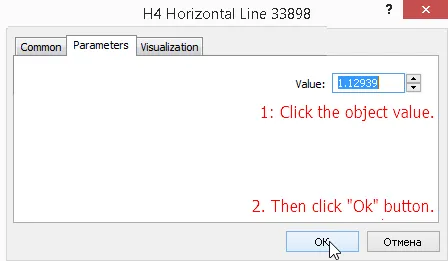
Fig. 5. Normalization through the properties dialog box.
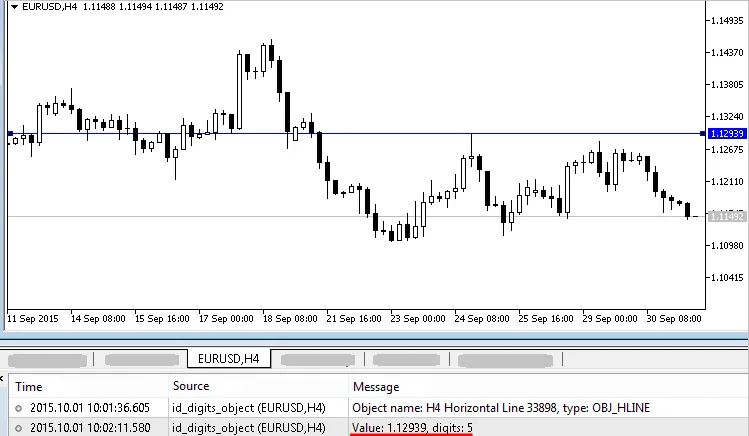
Fig. 6. The same horizontal line, but with a normalized value.
If you need to normalize the anchor point values of manually set objects programmatically, there’s a handy tool available. Check out this ID Rounding or deleting 3 for MT5 indicator, which not only helps normalize values but can also round them up to your desired decimal point if necessary.




Comments 0